介紹
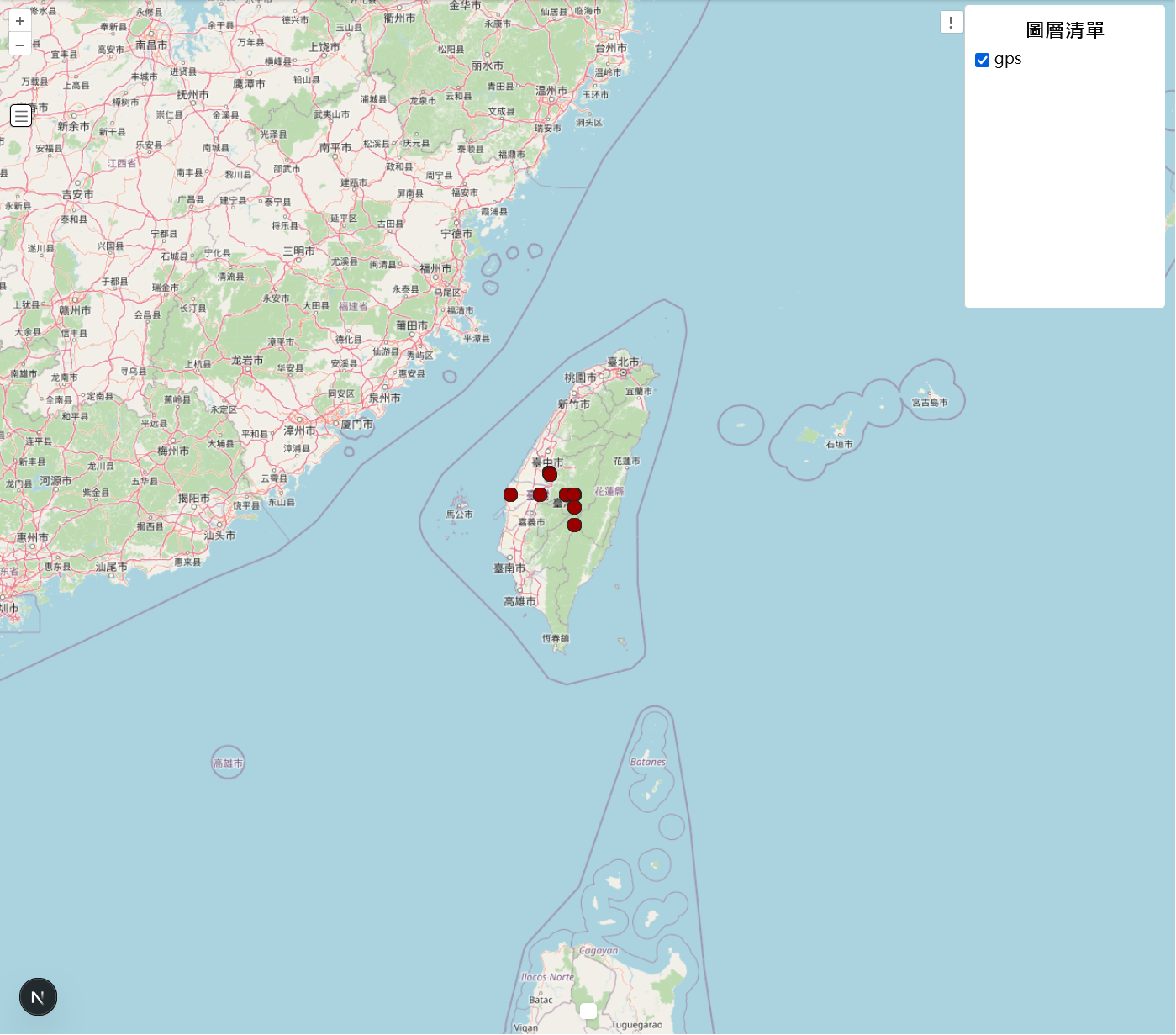
在基於OpenLayer的開發的地圖專案中,若是需要手動開發組件官方推薦的方式為 Custom Control。
OpenLayers 控制項(Control) 是一種將自訂功能封裝到地圖使用者介面中的方式。它是一個獨立的類別, 讓你將特定的 HTML 元素、CSS 樣式和 JavaScript 邏輯綁定在一起。
實作圖層開關控制項
基本的起手是為建立一個class繼承ol/control,建構子中我們先創建好一個容器、按鈕、圖層容器。 一開始的layerSidebar為關閉需要按下button才會顯示。
handleOpenSidebar內比較重要的是取得地圖中的圖層,在control中要取得ol Map物件 使用this.getMap即可,而進一步地透過map.getLayers().getArray()可以取得 圖層物件清單。這邊值得注意的還有layer.getProperties().name,若要讓圖層的properties有name這個屬性 需要在建立圖層的階段就設定好,如下面的範例所示。
javascriptimport { Control } from "ol/control";

class CustomControl extends Control {
  constructor() {
    const button = document.createElement("button");
    button.innerHTML = "!";

    const container = document.createElement("div");
    container.className = "custom-layerlist ol-unselectable ol-control";
    container.style.position = "absolute";
    container.style.top = "10px";
    container.style.right = "10px";
    container.appendChild(button);

    const layerSidebarDiv = document.createElement("div");
    layerSidebarDiv.id = "layer-sidebar";
    layerSidebarDiv.style.position = "absolute";
    layerSidebarDiv.style.top = "60px";
    layerSidebarDiv.style.right = "0";
    layerSidebarDiv.style.width = "200px";
    layerSidebarDiv.style.height = "300px";
    layerSidebarDiv.style.overflowY = "auto";
    layerSidebarDiv.style.margin = "10px";
    layerSidebarDiv.style.borderRadius = "4px";
    layerSidebarDiv.style.backgroundColor = "white";
    layerSidebarDiv.style.borderLeft = "1px solid #ccc";
    layerSidebarDiv.style.padding = "10px";
    layerSidebarDiv.style.display = "none";
    document.body.appendChild(layerSidebarDiv);

    super({
      element: container,
      target: options.target,
    });

    button.addEventListener("click", this.handleOpenSidebar.bind(this), false);
  }

  handleOpenSidebar() {
    const sidebar = document.getElementById("layer-sidebar");
    const title = document.createElement("h3");
    title.textContent = "圖層清單";
    title.style.marginTop = "0";
    title.style.fontSize = "1.25rem";
    title.style.fontWeight = "bold";
    if (sidebar) {
      sidebar.innerHTML = "";
      sidebar.appendChild(title);
      sidebar.style.overflowY = "auto";
      sidebar.style.textAlign = "center";
      sidebar.style.display =
        sidebar.style.display === "block" ? "none" : "block";
      const element = this.element as HTMLElement;
      element.style.right =
        sidebar.style.display === "block" ? "210px" : "10px";
      const map = this.getMap();
      if (map) {
        const layers = map.getLayers().getArray();
        layers.forEach((layer, index) => {
          if (index === 0) return;
          if (layer instanceof TileLayer || layer instanceof VectorLayer) {
            if (layer instanceof VectorLayer) {
              console.log(layer);
              console.log(layer.get("styleInfo"));
            }
            const layerName =
              layer.getProperties().name || `Layer ${index + 1}`;
            const layerDiv = document.createElement("div");
            layerDiv.id = `layer-${index}`;
            layerDiv.style.display = "flex";
            layerDiv.style.alignItems = "center";
            layerDiv.style.gap = "5px";

            const checkbox = document.createElement("input");
            checkbox.type = "checkbox";
            checkbox.checked = layer.getVisible();
            checkbox.onchange = () => {
              layer.setVisible(checkbox.checked);
            };
            checkbox.style.marginTop = "5px";
            const label = document.createElement("label");
            label.textContent = layerName;

            layerDiv.appendChild(checkbox);
            layerDiv.appendChild(label);
            sidebar.appendChild(layerDiv);
          }
        });
      }
    }
  }
}
javascriptconst vectorLayer = new VectorLayer({
  source: vectorSource,
  properties: { name: layerName },
})
成果